
ADA website compliance means your website must be accessible to people with disabilities — including those who use screen readers, keyboard navigation, or other assistive technology — in accordance with the Web Content Accessibility Guidelines (WCAG) 2.1 Level AA standard. Florida is currently the second-highest state in the country for ADA website lawsuits, with 950 lawsuits filed in 2025 alone — a 51% increase from 2024. Settlements typically range from $5,000 to $75,000, plus attorney fees and mandatory remediation costs. The most effective protection is proactive compliance before you receive a demand letter, not after.
You probably didn’t think much about ADA compliance when you launched your website. Most small business owners don’t. You hired a designer, the site looked great, and you moved on to running your business.
Then one morning you open your email and there it is — a demand letter from a law firm you’ve never heard of, telling you your website is inaccessible to people with disabilities and threatening a federal lawsuit unless you pay a settlement.
It’s happening to Florida small business owners at a rate that has nearly doubled in the past two years. And the business owners it happens to almost always say the same thing: I had no idea this was even possible.
This guide is for you — whether you’ve received a letter already, heard about this issue and want to get ahead of it, or are simply trying to run a smart, protected business in 2026. We’ll cover what ADA compliance actually means for your website, what the legal risk looks like in Florida specifically, what WCAG 2.2 requires, and exactly what you can do about it today.
View our ADA website compliance solutionWhat Is ADA Website Compliance?
The Americans with Disabilities Act (ADA), signed into law in 1990, was originally written to ensure physical access — ramps, accessible restrooms, parking spaces — for people with disabilities. But courts have consistently interpreted Title III of the ADA (which applies to “places of public accommodation”) to include websites.
That means if you have a business website — regardless of whether you have a physical storefront — you may be legally required to make it accessible to people with disabilities, including:
- Blind or low-vision users who rely on screen readers to interpret your content
- Deaf or hard-of-hearing users who need captions for video content
- Users with motor disabilities who navigate entirely by keyboard rather than mouse
- Users with cognitive disabilities who need clear, consistent navigation and readable content
The legal standard that courts use to evaluate website accessibility is the Web Content Accessibility Guidelines (WCAG), developed by the World Wide Web Consortium (W3C). The current legally-referenced standard is WCAG 2.1 Level AA. The newer WCAG 2.2, published in October 2023, adds nine additional criteria and is now considered best practice — and is where compliance is heading.
If your website fails to meet these standards, anyone with a disability who experiences barriers on your site can file a complaint or lawsuit under the ADA. They don’t need to be a customer. They don’t need to live in Florida. They just need to encounter the barrier.
The Florida Reality: Why This Matters More Here Than Almost Anywhere Else
Florida is the #2 state in the country for ADA website lawsuits. In 2025, 950 lawsuits were filed against Florida businesses — a 51% increase from 629 in 2024, according to EcomBack’s 2025 Annual ADA Lawsuit Report. Only New York filed more.
This isn’t a coincidence. Florida has a combination of factors that make it a high-target state:
- A large retired population with higher rates of vision and mobility impairments
- A dense small business economy, particularly in Tampa Bay, Orlando, and South Florida
- Active plaintiff law firms that specifically target Florida businesses
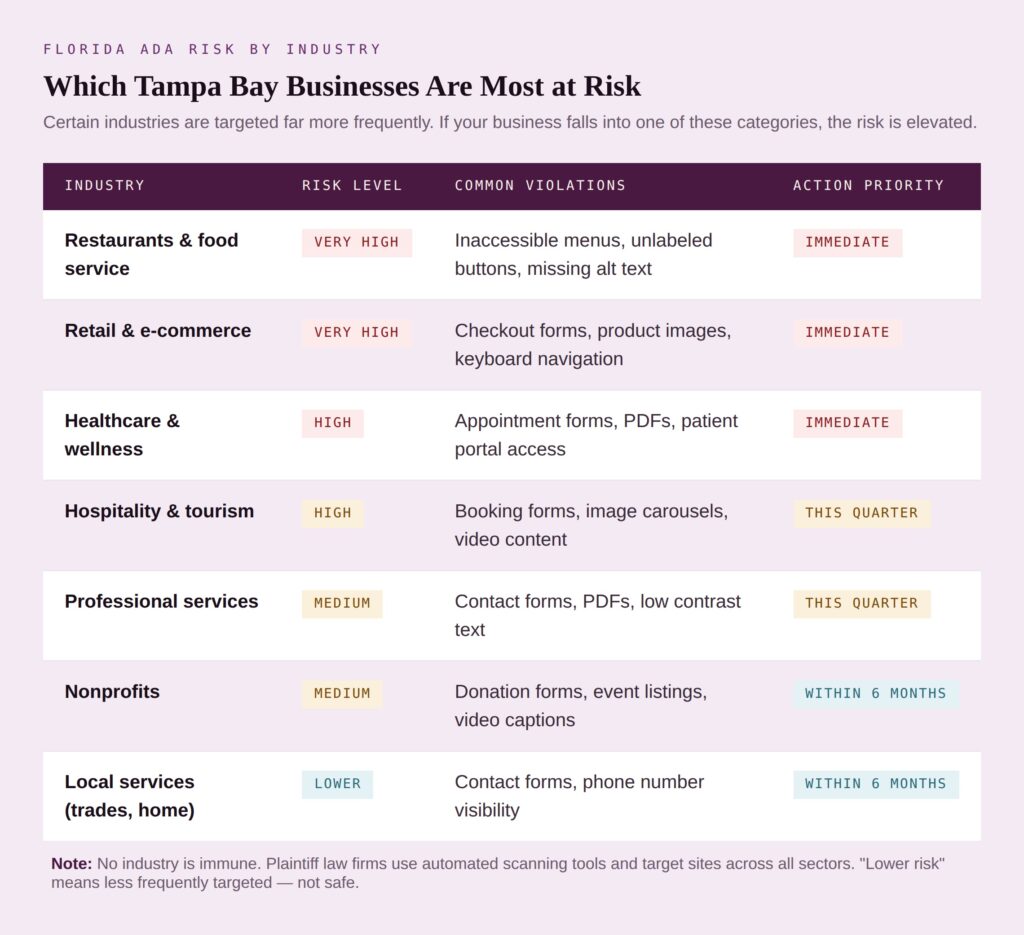
- A high concentration of hospitality, restaurant, retail, and healthcare businesses — the industries most frequently sued
And here’s the part that surprises most business owners: 77% of ADA website lawsuits target companies with under $25 million in revenue. This isn’t about big corporations failing their accessibility duties. It’s overwhelmingly small businesses — restaurants, spas, boutiques, professional services firms, nonprofits — that get hit most often.
One Tampa Bay-area example: an Orlando flower shop owner named Ajeeta Khanna received a demand letter in late 2024 claiming her website was not ADA compliant. Like many small business owners, she had assumed her web developer handled compliance. Her attorney advised settling, and she ultimately paid more than $7,000 in legal fees and settlement costs — for a website accessibility issue she didn’t even know existed.
Her situation is not unusual. It is, in fact, becoming routine.
For St. Petersburg and Tampa Bay small business owners especially, the combination of Florida’s litigation climate and the region’s tourism and hospitality economy makes this a genuine and growing risk — one that can be addressed for far less than the cost of a single lawsuit.
What Does WCAG 2.2 Actually Require? (Plain English)
WCAG is organized around four core principles — your website must be Perceivable, Operable, Understandable, and Robust (POUR). Within those principles, WCAG 2.2 Level AA includes 86 specific testable success criteria.
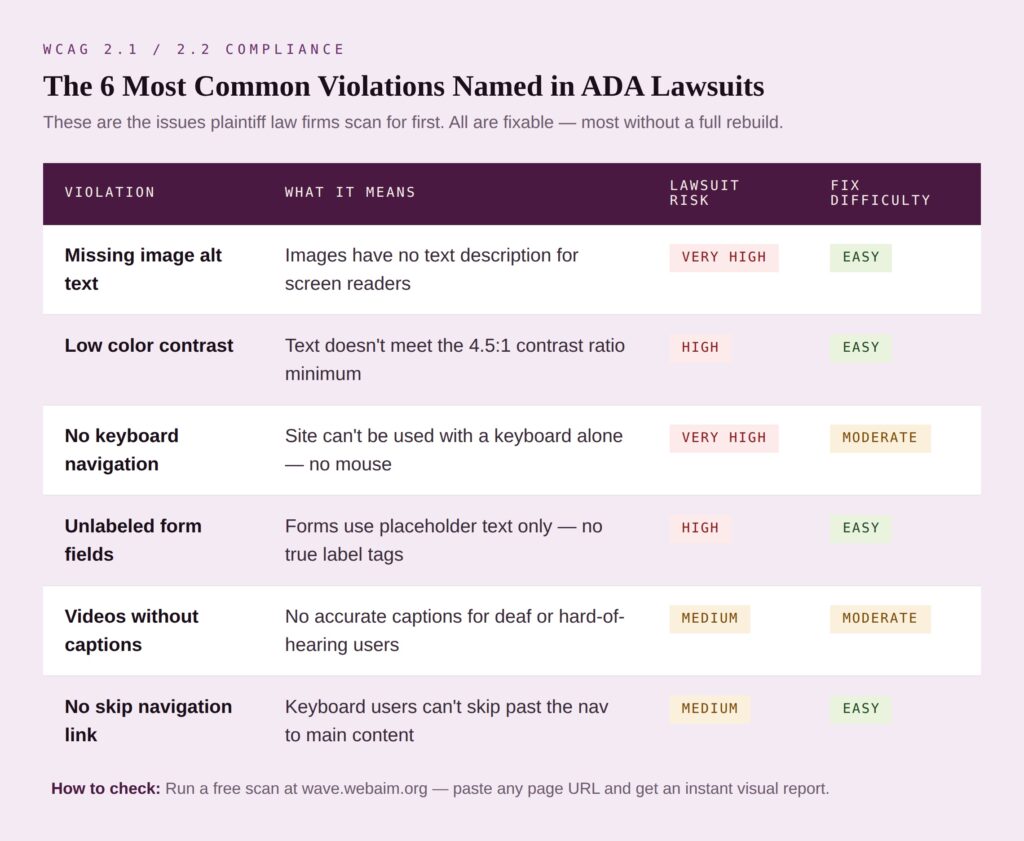
For most small business WordPress websites, the most commonly cited violations — and the ones most frequently named in lawsuits — include:
- Missing Image Alt Text
Every image on your website needs a text description that screen readers can read aloud to blind users. If your product photos, team photos, and banner images have no alt text, screen reader users experience a completely broken page. This is one of the most common violations found and one of the easiest to fix. - Low Color Contrast
If the text on your website doesn’t have enough contrast against its background — light gray text on white, for example — users with low vision can’t read it. WCAG 2.1 AA requires a minimum contrast ratio of 4.5:1 for normal text. - No Keyboard Navigation
Every function on your website — clicking buttons, filling out forms, navigating menus — must be operable with a keyboard alone, without a mouse. Many WordPress sites with dropdown menus or custom sliders fail this test entirely. - Forms Without Proper Labels
Contact forms, quote request forms, newsletter sign-ups — every form field must have a visible, properly associated label. Placeholder text only doesn’t count. Screen readers need a true label to tell users what each field is for. - Videos Without Captions
Any video on your website needs accurate closed captions for deaf and hard-of-hearing users. Auto-generated captions from YouTube don’t count — they need to be accurate. - No Skip Navigation Link
Keyboard users have to tab through your entire header and navigation on every page before reaching content — unless you provide a “skip to main content” link at the top of the page.
What’s New in WCAG 2.2
WCAG 2.2 became the official W3C standard in October 2023. The most practically relevant new criteria for small business websites:
- Focus Not Obscured: When a user tabs to a focused element, it can’t be completely hidden by a sticky header or floating banner
- Dragging Movements: Any feature requiring dragging (like sliders) must have a non-dragging alternative
- Target Size Minimum: Clickable elements must be at least 24×24 CSS pixels with adequate spacing
- Accessible Authentication: Login processes can’t require solving a cognitive puzzle without an alternative
- Consistent Help: Help mechanisms (chat, phone, contact link) must appear in the same location on every page
The good news: WCAG 2.2 is backwards compatible — meeting 2.2 automatically means you meet 2.1. Courts currently apply WCAG 2.1 AA as the legal benchmark. Building toward 2.2 now is simply future-proofing.
What Happens When You Get a Demand Letter
Plaintiff law firms use automated scanning software to identify website accessibility violations at scale. They don’t need to manually visit your site — the software scans thousands of websites, flags violations, and generates demand letters in batches. That’s why these letters arrive with no warning.
If you receive one, here’s the typical process:
- The demand letter arrives — usually giving you 30–60 days to respond. It will cite specific ADA violations and demand a settlement payment, remediation, or both.
- Do not ignore it — ignoring a demand letter dramatically increases your legal risk. If you don’t respond, a formal lawsuit becomes more likely.
- Forward it to an attorney within 48 hours — you need legal counsel who understands ADA Title III. This is not a situation to handle alone.
- Begin documented remediation immediately — courts look favorably on defendants who demonstrate good-faith compliance efforts. Starting remediation upon receiving a letter is one of your strongest defenses.
- Most cases settle — typical small business settlements range from $5,000 to $20,000. However, settlements also require documented remediation within 90–180 days and ongoing monitoring — costs that often exceed the settlement payment itself.
The total cost of an ADA website lawsuit for a small business typically runs $15,000–$50,000 when you factor in settlement payment, your own attorney fees, and mandated remediation costs. Proactive compliance — which typically costs $1,500–$5,000 for a small business website — is almost always the better investment.
What About Accessibility Widgets?
Not All Accessibility Widgets Are Created Equal
You’ve probably seen the warnings about accessibility overlays and widgets — and many of them are warranted. In 2025, over 22% of all ADA website lawsuits targeted sites that already had cheap accessibility widgets installed. The FTC fined one major overlay provider $1 million in January 2025 for misleading compliance claims. Basic free overlays and thin “one-click compliance” tools genuinely do not constitute real ADA compliance, and courts have said so repeatedly.
But there is an important distinction that most of those warnings miss: not all widgets are the same.
Reinhardt Designs has partnered with UserWay — the world’s #1 web accessibility solution, trusted by over 1 million websites including governments, banks, major enterprises, and thousands of small businesses. UserWay has been featured in Forbes and TechCrunch and has an installation base over 20 times larger than its nearest competitor. This is not a cheap overlay slapped on top of your website. It is a fundamentally different product.
Here is what makes UserWay’s AI-powered paid widget different from the imitators that are getting sued:
It remediates your actual code. UserWay’s AI engine works in the background to fix the underlying HTML and ARIA attributes that assistive technologies rely on — not just the visual presentation. Screen readers, keyboard navigation, and other assistive technology get real fixes, not a cosmetic layer on top of broken code.
It updates automatically. Every time you publish new content, add a page, or update your site, UserWay’s AI automatically scans for new violations and remediates them. You don’t need to manually re-audit every time your site changes.
It provides legal support. If you are an annual AI-Pro Widget customer and you receive a demand letter or lawsuit, UserWay provides a legal intelligence report, leverage points for negotiation, guidance on obtaining an out-of-court settlement, a critical action plan, and a phone consultation with their Legal Support Team. That is a level of protection no basic overlay comes close to offering.
It covers WCAG 2.1, 2.2, ADA, COPPA, FERPA, HIPAA, and GDPR. The compliance coverage is comprehensive and cross-regulatory — important for healthcare, education, and any business handling personal data.
It has zero impact on page load time. The widget and all remediation work asynchronously after your page finishes loading. Your site speed and Core Web Vitals are not affected.
Reinhardt Designs installs and configures UserWay for Tampa Bay and Bay Area small businesses starting at $495/year— roughly $41/month for enterprise-grade AI-powered accessibility coverage, automatic updates, and legal protection built in. For most small businesses, that is less than the cost of a single hour of attorney time.
The cheap widgets being sued are real, and the warnings about them are valid. UserWay is not that. It is the professional-grade solution — and the one we stand behind.
View our ADA website compliance solutionThe SEO Benefit You May Not Know About
Here’s something most business owners are surprised to learn: ADA compliance and SEO are deeply aligned. The same technical improvements that make your website accessible also help Google understand, crawl, and rank your website:
- Image alt text helps blind users and gives Google keyword-rich context for your images
- Clear heading structure (H1, H2, H3) helps screen reader navigation and Google’s page hierarchy understanding
- Fast page load times are a Core Web Vitals ranking factor and critical for users with cognitive disabilities
- Descriptive link text helps screen readers and gives Google better context for internal linking
- Proper form labels help screen reader users and improve form completion rates
- Mobile responsiveness is both a WCAG requirement and Google’s primary indexing criterion
When Reinhardt Designs performs an ADA compliance audit and remediation on a client website, we consistently see SEO improvements alongside the compliance work — because they’re solving the same underlying problem: making content more clearly structured, more understandable, and more accessible to everyone, whether that’s a blind user, a Google bot, or a busy person on their phone.
What to Do Right Now: A Practical Checklist
You don’t need to resolve everything overnight. A smart, documented, good-faith compliance effort — started today — is the best protection you can have.
- Run a free automated scan at wave.webaim.org — paste your URL and see a visual report of issues on any page
- Check your images — does every meaningful image have alt text? Add alt text in your WordPress Media Library for any that don’t
- Check your color contrast — use the WebAIM Contrast Checker to verify your text meets the 4.5:1 minimum ratio
- Tab through your website using only your keyboard — can you reach every link, button, and form field?
- Check your contact form — does every field have a visible, descriptive label — not just placeholder text?
- Review your videos — do they have accurate captions?
- Add an Accessibility Statement page — documenting your compliance efforts demonstrates good faith and is a WCAG best practice
- Schedule a professional audit — automated scans catch roughly 30% of issues. Manual testing by an experienced specialist catches the rest
How Reinhardt Designs Can Help
We’ve been handling ADA compliance and WCAG remediation for Tampa Bay and Bay Area small businesses for over 15 years — and we’ve found that the most practical, cost-effective solution for the vast majority of small business websites is our UserWay AI-powered accessibility partnership.
Here is what we offer:
UserWay AI-Pro Widget — $495/year Our core accessibility solution. We install and configure UserWay’s enterprise-grade AI accessibility widget on your WordPress site. It automatically remediates WCAG 2.1 and 2.2 violations in your underlying code, updates whenever your site changes, provides an accessibility certification you can display publicly, and includes legal support if you ever receive a demand letter. One small snippet of code. Rapid implementation. Continuous automated compliance. This is the solution powering over 1 million websites worldwide.
Professional ADA Compliance Audit Before installing UserWay, we perform a thorough technical audit of your website against WCAG 2.1 AA and 2.2 standards. You receive a detailed remediation report prioritized by risk level — so you know exactly where you stand and what UserWay handles automatically versus what may need manual attention.
Emergency Compliance Remediation If you have received a demand letter, we move fast. We’ve helped businesses achieve documented compliance within a week when the timeline required it. UserWay’s legal support for annual customers means you’re not facing that demand letter alone.
Full WordPress Rebuilds with Accessibility Built In For businesses whose sites are too outdated to remediate cost-effectively, we build new WordPress websites with WCAG 2.2 compliance and UserWay integration baked in from the first line of code.
Ongoing Monitoring UserWay’s AI monitors your site continuously — but we also conduct periodic manual reviews to catch anything the automated system flags as needing human judgment. Compliance isn’t a one-time event, and we make sure it stays current.
One of our most recent client testimonials says it clearly:
“Needed emergency update for WCAG, accessibility ADA non-compliance. We are a small company that did not have professional oversight for our WordPress website, mobile device issues, etc. They came to the rescue and got me updated and compliant within a week and also increased my online activity.”
— Reinhardt Designs Client, Tampa Bay
Is Your Website ADA Compliant?
Don’t wait for a demand letter to find out. Reinhardt Designs installs and configures UserWay — the world’s #1 AI-powered accessibility solution — for Tampa Bay and Bay Area small businesses. Starting at $495/year with legal support included.
ADA Website Compliance — FAQ – Frequently Asked Questions
Do small businesses in Florida legally need an ADA-compliant website?
Yes — courts have consistently ruled that websites are covered under Title III of the ADA as places of public accommodation, applying to private businesses of any size. Florida is the second-highest state for ADA website lawsuits with 950 cases in 2025. There is no small-business exemption.
For a typical small business WordPress website, professional remediation costs between $1,500 and $5,000 depending on the issues found and site complexity. This is significantly less than the typical ADA lawsuit settlement, which ranges from $5,000 to $75,000 plus attorney fees and ongoing monitoring requirements.
WCAG 2.2 is the current international web accessibility standard, published in October 2023. It adds nine new success criteria to WCAG 2.1. Courts currently apply WCAG 2.1 Level AA as the legal benchmark. WCAG 2.2 is backwards compatible — meeting 2.2 automatically satisfies 2.1 — so building toward 2.2 now is the smartest long-term strategy.
Do not ignore it. Forward it to an ADA-experienced attorney within 48 hours. Begin documented remediation immediately — courts favor defendants demonstrating good-faith compliance efforts. Most cases settle before trial. Small business settlements typically range from $5,000 to $20,000 plus attorney fees and mandated remediation.
It depends entirely on the widget. Basic free overlays and cheap one-click compliance tools do not constitute genuine ADA compliance — courts have repeatedly said so, and in 2025 over 22% of ADA website lawsuits targeted sites that already had these basic widgets installed. However, enterprise-grade AI-powered solutions like UserWay — the world’s #1 web accessibility solution with over 1 million installations — are a fundamentally different product. UserWay’s paid AI widget remediates your website’s underlying code, updates automatically when you publish new content, covers WCAG 2.1 and 2.2, and includes legal support for annual customers who receive demand letters. Reinhardt Designs installs and configures UserWay for small businesses starting at $495/year. The difference is not just marketing — it is the architecture of how the solution works.